
This is Wonder's own quick start guide for the Wonder Phone. The text version is below the pictures.

Contacting Wonder
For help or questions about the phone itself, Wonder asks you to contact them by phone or text at (845) 200-2323.
Wonder's warranty
- Wonder offers a 1-year warranty on all its phones, which it describes as "no questions asked."
- Wonder offers a lifetime warranty on its cases and accessories.
Warranty claims are handled by Wonder — contact them at the number above.
Updating the phone (Update app)
Wonder says it releases updates every 2–3 weeks to improve the phone and add new features. When an update is available, you'll find it in the Update app on the phone. To download it properly, make sure you have mobile data or are connected to Wi-Fi.
Android Auto
The Wonder Phone connects to your car through a USB cable, or through Bluetooth if your car supports wireless Android Auto.
Keypad shortcuts
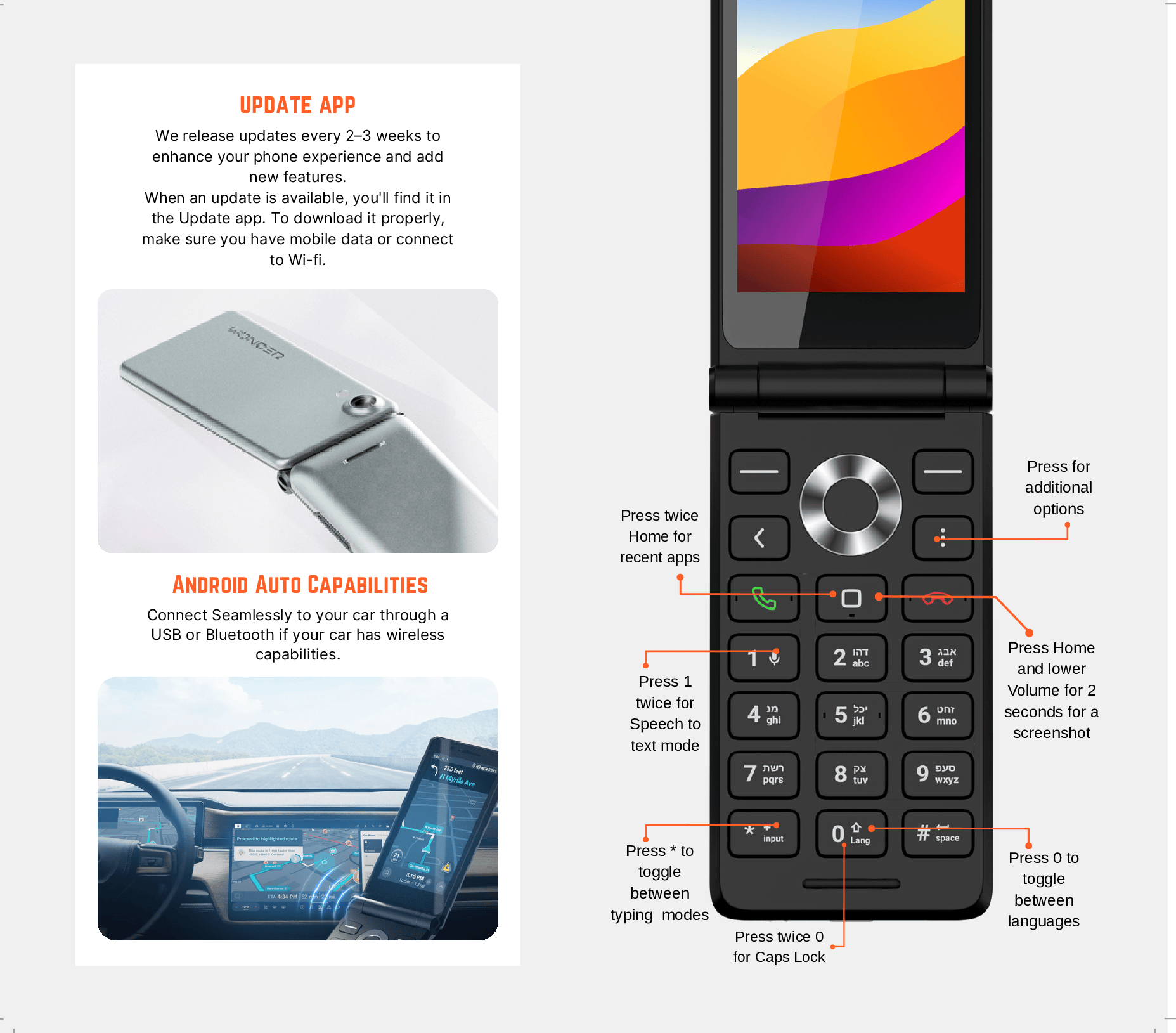
- Press 1 twice — speech-to-text (talk instead of typing).
- Press 0 — switch between languages.
- Press 0 twice — Caps Lock.
- Press * — switch between typing modes.
- Press Home twice — see your recent apps.
- Press Home and Volume Down together for 2 seconds — take a screenshot.
- Press the ⋮ (three-dot) key — more options.